

Sd Textual Inversion Training
Textual-inversion fine-tuning for Stable Diffusion using d🧨ffusers
This notebook shows how to "teach" Stable Diffusion a new concept via textual-inversion using 🤗 Hugging Face 🧨 Diffusers library.
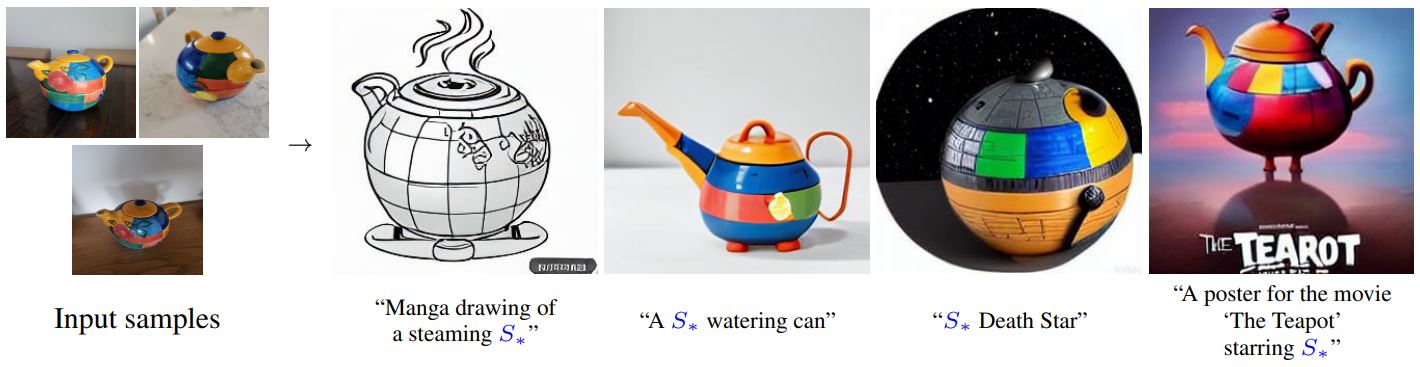 By using just 3-5 images you can teach new concepts to Stable Diffusion and personalize the model on your own images
For a general introduction to the Stable Diffusion model please refer to this colab.
Initial setup
Settings for teaching your new concept
Get the training images:
Download the images from the internet and save them locally.
You can also upload the images to colab or load from google drive, please check the next section if you want to use that.
[None, None, None, None]
Load images from local folder or google drive
You can also load your own training images from google drive or upload them to colab usingthe files taband then provide the path to the directory containing images.
Make sure that the directory only contains images as the following cells will read all the files from the provided directory.
The images_path specified does not exist, use the colab file explorer to copy the path : ./cat_toy
Setup and check the images you have just added

Teach the model a new concept (fine-tuning with textual inversion)
Execute this this sequence of cells to run the training process. The whole process may take from 1-4 hours. (Open this block if you are interested in how this process works under the hood or if you want to change advanced training settings or hyperparameters)
Create Dataset
Setting up the model
We have added the placeholder_token in the tokenizer so we resize the token embeddings here, this will a new embedding vector in the token embeddings for our placeholder_token
Embedding(49409, 1024)
Initialise the newly added placeholder token with the embeddings of the initializer token
In Textual-Inversion we only train the newly added embedding vector, so lets freeze rest of the model parameters here
Creating our training data
Let's create the Dataset and Dataloader
Create noise_scheduler for training
/usr/local/lib/python3.7/dist-packages/diffusers/utils/deprecation_utils.py:35: FutureWarning: It is deprecated to pass a pretrained model name or path to `from_config`.If you were trying to load a scheduler, please use <class 'diffusers.schedulers.scheduling_ddpm.DDPMScheduler'>.from_pretrained(...) instead. Otherwise, please make sure to pass a configuration dictionary instead. This functionality will be removed in v1.0.0. warnings.warn(warning + message, FutureWarning)
Training
Define hyperparameters for our training
If you are not happy with your results, you can tune the learning_rate and the max_train_steps
Train!
Run the code with your newly trained model
If you have just trained your model with the code above, use the block below to run it
To save this concept for re-using, download the learned_embeds.bin file or save it on the library of concepts.
Use the Stable Conceptualizer notebook for inference with persistently saved pre-trained concepts
Fetching 12 files: 0%| | 0/12 [00:00<?, ?it/s]