

Sm Processing Feature Transformation With Dask
Feature transformation with Amazon SageMaker Processing and Dask
This notebook's CI test result for us-west-2 is as follows. CI test results in other regions can be found at the end of the notebook.
Typically a machine learning (ML) process consists of few steps. First, gathering data with various ETL jobs, then pre-processing the data, featurizing the dataset by incorporating standard techniques or prior knowledge, and finally training an ML model using an algorithm.
Often, distributed data processing frameworks such as Dask are used to pre-process data sets in order to prepare them for training. In this notebook we'll use Amazon SageMaker Processing, and leverage the power of Dask in a managed SageMaker environment to run our preprocessing workload.
What is Dask Distributed?
Dask.distributed: is a lightweight and open source library for distributed computing in Python. It is also a centrally managed, distributed, dynamic task scheduler. It is also a centrally managed, distributed, dynamic task scheduler. Dask has three main components:
dask-scheduler process: coordinates the actions of several workers. The scheduler is asynchronous and event-driven, simultaneously responding to requests for computation from multiple clients and tracking the progress of multiple workers.
dask-worker processes: Which are spread across multiple machines and the concurrent requests of several clients.
dask-client process: which is is the primary entry point for users of dask.distributed
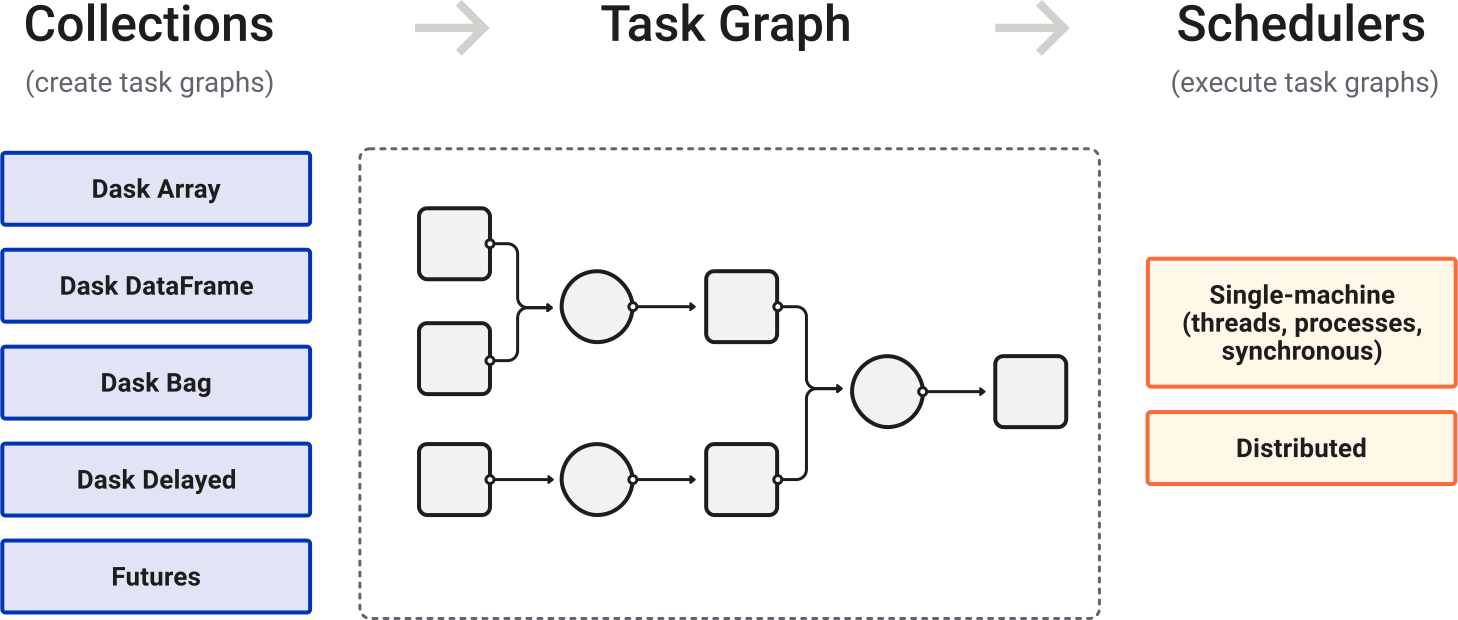
source: https://docs.dask.org/en/latest/
Setup
Let's start by specifying:
- The S3 bucket and prefixes that you use for training and model data. Use the default bucket specified by the Amazon SageMaker session.
- The IAM role ARN used to give processing and training access to the dataset.
Using Amazon SageMaker Processing to execute a Dask job
Downloading dataset and uploading to Amazon Simple Storage Service (Amazon S3)
The dataset used here is the Census-Income KDD Dataset. The first step are to select features, clean the data, and turn the data into features that the training algorithm can use to train a binary classification model which can then be used to predict whether rows representing census responders have an income greater or less than $50,000. In this example, we will use Dask distributed to preprocess and transform the data to make it ready for the training process. In the next section, you download from the bucket below then upload to your own bucket so that Amazon SageMaker can access the dataset.
Build a dask container for running the preprocessing job
An example Dask container is included in the ./container directory of this example. The container handles the bootstrapping of Dask Scheduler and mapping each instance to a Dask Worke. At a high level the container provides:
- A set of default worker/scheduler configurations
- A bootstrapping script for configuring and starting up scheduler/worker nodes
- Starting dask cluster from all the workers including the scheduler node
After the container build and push process is complete, use the Amazon SageMaker Python SDK to submit a managed, distributed dask application that performs our dataset preprocessing.
Build the example Dask container.
Create an Amazon Elastic Container Registry (Amazon ECR) repository for the Dask container and push the image.
Run the preprocessing job using Amazon SageMaker Processing on Dask Cluster
Next, use the Amazon SageMaker Python SDK to submit a processing job. Use the the custom Dask container that was just built, and a Scikit Learn script for preprocessing in the job configuration.
Create the Dask preprocessing script.
Run a processing job using the Docker image and preprocessing script you just created. When invoking the dask_processor.run() function, pass the Amazon S3 input and output paths as arguments that are required by our preprocessing script to determine input and output location in Amazon S3. Here, you also specify the number of instances and instance type that will be used for the distributed Spark job.
Inspect the preprocessed dataset
Take a look at a few rows of the transformed dataset to make sure the preprocessing was successful.
Now, you can use the output files of the transformation process as input to a training job and train a regression model.
Notebook CI Test Results
This notebook was tested in multiple regions. The test results are as follows, except for us-west-2 which is shown at the top of the notebook.