

Phoenix Overview


Arize Phoenix
Arize Phoenix is a fully open-source AI observability platform. It's designed for experimentation, evaluation, and troubleshooting. It provides:
- Tracing - Trace your LLM application's runtime using OpenTelemetry-based instrumentation.
- Evaluation - Leverage LLMs to benchmark your application's performance using response and retrieval evals.
- Datasets - Create versioned datasets of examples for experimentation, evaluation, and fine-tuning.
- Experiments - Track and evaluate changes to prompts, LLMs, and retrieval.
- Playground- Optimize prompts, compare models, adjust parameters, and replay traced LLM calls.
- Prompt Management- Manage and test prompt changes systematically using version control, tagging, and experimentation.
Phoenix is vendor and language agnostic with out-of-the-box support for popular frameworks and AI providers.
Phoenix runs practically anywhere, including your local machine, a Jupyter notebook, a containerized deployment, or in the cloud.

The most important thing about choosing a good observability and evaluation tool is first: "Does the tool help me build good and responsible AI systems?" All modern platforms will and can do this. The things that make Phoenix somewhat unique are:
- 🌎 It's fully open-source and its development is driven heavily by developer feedback
- 🔐 It's privacy first, where the data is easily accessible inside your VPC or computer
- 🕊️ It has no feature gates and strives to maximize value for its users
- ⚙️ It's designed to be customizable to your needs through APIs and SDKs
- ✌️ Built on open standards and protocols like OTEL
- 💸 It's free - because its goal is to be a platform built by developers for developers
The AI Problem

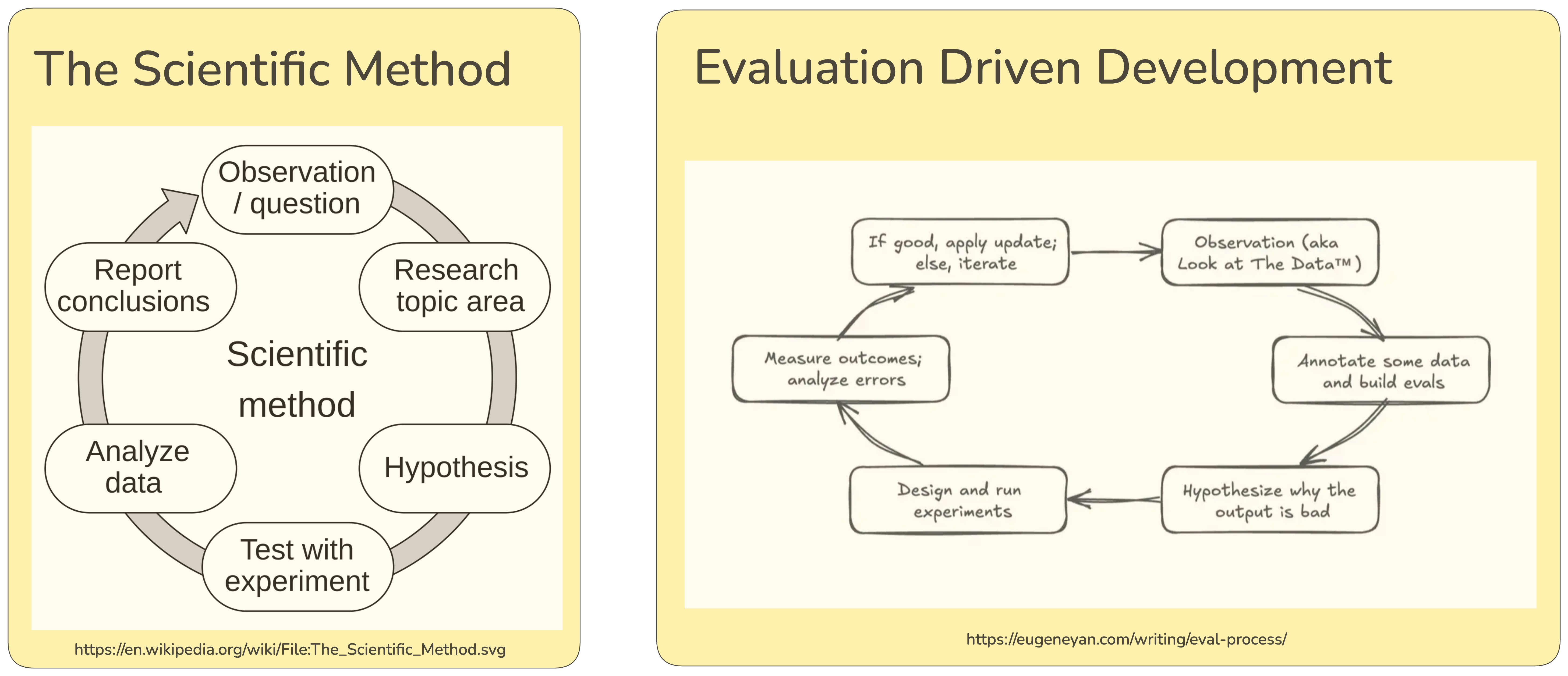
Talking to an LLM can feel like talking to a new species. We don't think this is an accident. In many ways we are AI scientists observing emergent behavior and the AI development cycle really is the scientific method in disguise. Just as scientists meticulously record experiments and take detailed notes to advance their understanding, AI systems require rigorous observation through tracing, annotations, and experimentation to reach their full potential. The goal of AI-native products is to build tools that empower humans, and it requires careful human judgment to align AI with human preferences and values.
👷♀️ Let's build an App
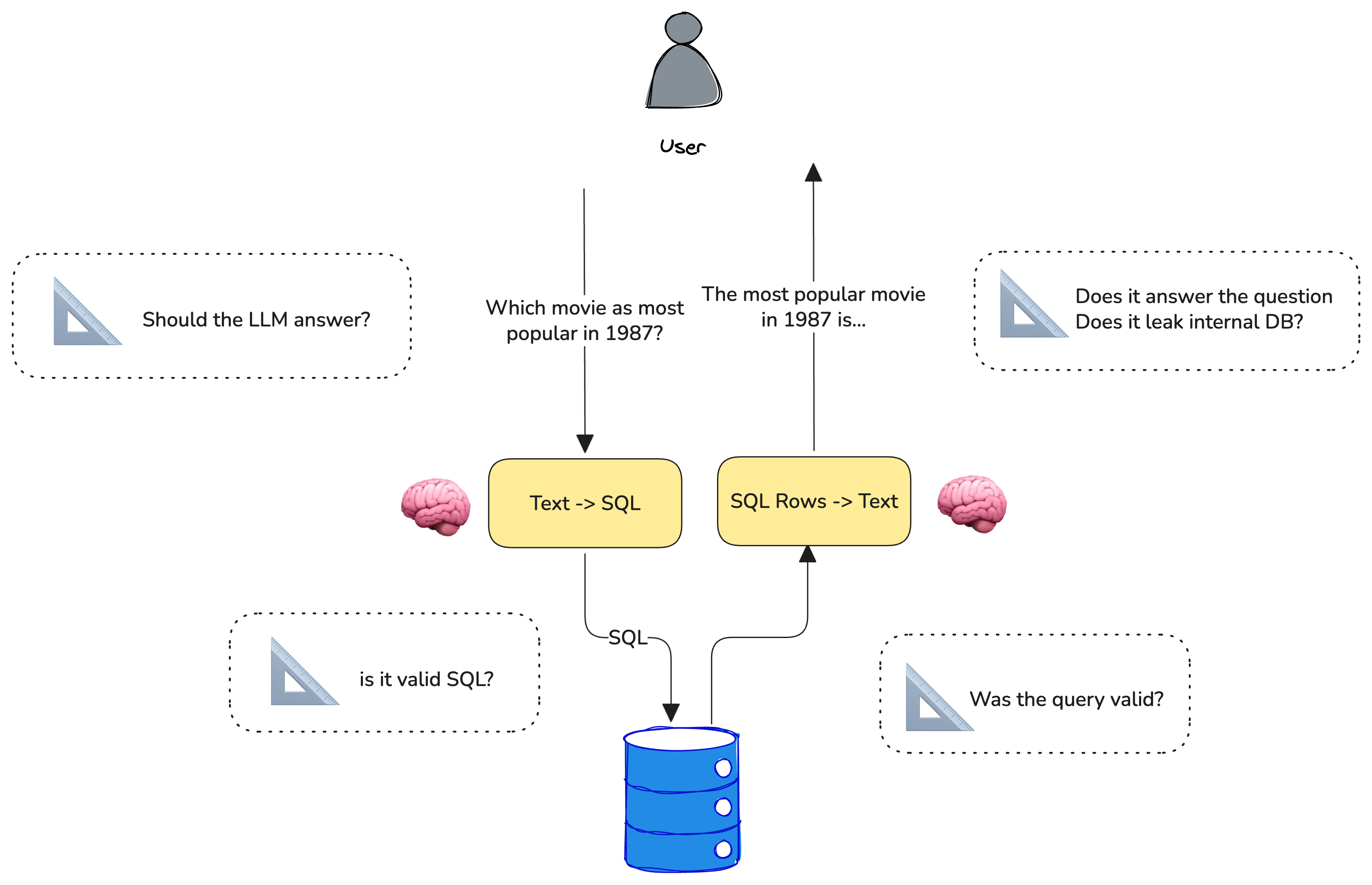
Let's build an App that uses common LLM prompting techniques. Specifically, let's try to get an LLM to produce structured output. Let's tackle a particularly messy problem - getting an LLM to produce SQL.
We are going to build a simple agent that can answer movie trivia. While this can probably be performed by an LLM, we are going to force the LLM to look up the movie trivia from a SQL database. You can imagine this technique could be very useful if you wanted to expose an internal knowledge store to your agent.
🎥 Tracing
Just like scientists, every AI engineer needs a great camera. For this we will use OpenTelemetry. Telemetry produces traces of your LLM, Tools, and more.
OpenTelemetry helps to capture the inputs and outputs to our LLM system. We want to trace enough parts of our system so that we can debug failure modes and perform error analysis.
Let's roll camera.
This tutorial assumes you have a locally running Phoenix server. We can think of phoenix like a video recorder, observing every activity of your AI application.
phoenix serve
Lastly, let's make sure we have our OpenAI API key set up.
🗄️ Download Movie Data
We are going to use a movie dataset that contains recent titles and their ratings. We will use DuckDB as our SQL database so that we can run the queries directly in the notebook, but you can imagine that this could be a pre-existing SQL database with business-specific data.
Convert Human Questions -> SQL (text-to-sql)
Let's use an LLM to take human questions and to convert it into SQL so we can query the data above. Note that the prompt does a few specific things:
- We need to tell the LLM what our database table looks like. Let's pass it the columns and the column types
- We want the output to be pure SQL (select * from ...). LLMs tend to respond in markdown. Let's try to make sure it doesn't
Looks like the LLM is producing SQL. Let's try running the query against the database and see if we get the expected results. Just because the SQL query looks valid doesn't mean it's correct.
Note: we again wrap this function in a decorator and denote that this is a tool that the LLM is using. While not explicitly a tool call, it's largely the same paradigm.
Let's put the pieces together and see if we can create a movie agent that feels helpful. Here we are performing very simple RAG where the SQL query results are being passed to an LLM to synthesize a human-friendly answer.
Looks like we have a working movie expert. Or do we? Let's double check. Let's run the agent over some examples we think the agent should be able to answer.
Let's run the above queries against our agent and record it under a project as a "baseline" so we can see if we can improve it.
Let's look at the data and annotate it to see what the issues might be. Go to Settings > Annotations and add a correctness annotation config. Configure it as a categorical annotation with two categories, correct and incorrect. We can now quickly annotate the 7 traces (e.g. the agent spans) above as correct or incorrect. Once we've annotated some data we can bring it back into the notebook to analyze it.
Let's see if we can create an LLM judge that aligns with our human annotations.
🧪Experimentation
The velocity AI application development is bottlenecked by high quality evaluations because engineers are often faced with hard trade-offs: which prompt or LLM best balances performance, latency, and cost. Quality Evaluations are critical as they help answer these types of questions with greater confidence.
Evaluation consists of three parts — data, task, and evals. We'll start with data.

Let's store the movie questions we created above as a versioned dataset in phoenix.
Next, we'll define the task. The task is to generate SQL queries from natural language questions.
Finally, we'll define the evaluators. We'll use the following simple function that produces 1 if we got results and 0 if not.
Now let's run the experiment. To run the experiment, we pass the dataset of examples, the task which runs the SQL generation, and the evals described above.
Ok. Not looking very good. It looks like only 4 out 6 of our questions are yielding results. Let's dig in to see how we can fix these.
Interpreting the results
Now that we ran the initial evaluation, it looks like 2 of the results are empty due to getting the genre wrong.
Sci-Fineeds to be queried asScience FictionAnimeneeds to be queried asAnimation+ language specification.
These two issues would probably be improved by showing a sample of the data to the model (e.g. few shot example) since the data will show the LLM what is queryable.
Let's try to improve the prompt with few-shot examples and see if we can get better results.
Looking much better! Since the prompt shows that "Sci-Fi" is represented as "Science Fiction", the LLM is able to synthesize the right where clause.
Pro-tip: You can try out the prompt in the playground even before the next step!
Let's run the experiment again.
Looks much improved. It looks like we're getting data our of our system. But just because we are getting info out of the DB doesn't mean these records are useful. Let's construct an LLM judge to see if the results are relevant to the question.
The LLM judge's scoring closely matches our manual review, demonstrating its effectiveness as an automated evaluation method. This approach is particularly valuable when traditional rule-based scoring functions are difficult to implement.
The LLM judge also shows an advantage in nuanced understanding - for example, it correctly identifies that 'Anime' and 'Animation' are distinct genres, a subtlety our code-based evaluators missed. This highlights why developing custom LLM judges tailored to your specific task requirements is crucial for accurate evaluation.
We now have a simple text-to-sql pipeline that can be used to generate SQL queries from natural language questions. Since Phoenix has been tracing the entire pipeline, we can now use the Phoenix UI to convert the spans that generated successful queries into examples to use in Golden Dataset for regression testing as well.
Bringing it all together
Now that we've seen the experiment improve our outcome, let's put it to a test given the evals we built out earlier.
Our improved agent now is able to answer all 6 questions but our llm_correctness eval was able to spot that the agent responses are not very good:
- querying for
Animeand responding withFrozen IImisses the mark on anime being a japanese form of animation - the LLM thinks "top" or "best" means rating but doesn't take into account the number of votes.
Our movie-text-to-sql prompt still needs more instructions if we want to improve its performance. But we're on the right track and can find more ways to guide the LLM.
This tutorial demonstrated the core principles of building evals that work for AI applications. Here are the key concepts you should take away:
- Build & Trace: Instrument your AI application with tracing from day one
- Annotate: Use human judgment to label traces with simple heuristics like correct/incorrect
- Create Evaluators: Build both simple programmatic evals as well as LLM judges
- Experiment: Run systematic experiments to compare different approaches
- Iterate: Use evaluation results to improve prompts, models, or architecture
Bibliography
Yan, Z. (2025). An LLM-as-Judge Won't Save The Product—Fixing Your Process Will. eugeneyan.com. https://eugeneyan.com/writing/eval-process/