

Autogen Agents Orchestrator


AutoGen Orchestrator Agent
In this tutorial, we'll explore orchestrator agent workflows with AutoGen GroupChats.
Agent orchestration enables collaboration among multiple specialized agents, activating only the most relevant one based on the current subtask context. Instead of relying on a fixed sequence, agents dynamically participate depending on the state of the conversation. At termination, results are synthesized together.
Agent orchestrator workflows simplifies this routing pattern through a central orchestrator (GroupChatManager) that selectively delegates tasks to the appropriate agents. Each agent monitors the conversation but only contributes when their specific expertise is required. With Phoenix tracing, you get full visibility into the orchestration flow to see which agents engaged, when they were activated, and why.
In this example, we'll build a smart trip planning assistant where subtasks like destination research, hotel booking, and activity suggestions are dynamically sent to the right specialized agent.
By the end of this tutorial, you’ll learn how to:
-
Set up multiple specialized AutoGen agents in a
GroupChat -
Use a
GroupChatManagerto enable dynamic agent routing -
Incorporate human feedback in your agent set up
-
Trace and visualize agent interactions using Phoenix
⚠️ You'll need an OpenAI Key for this tutorial.
Set up Keys and Dependencies
Configure Tracing
Example Orchestrator Task: Travel Agent
This example shows how to build a dynamic travel planning assistant. A GroupChatManager coordinates specialized agents to adapt to the user's evolving travel needs.
User Interaction:
A UserProxyAgent acts as the human user, configured with human_input_mode="TERMINATE" and a custom is_termination_msg that ends the session when a message ends with TERMINATE.
Specialized Travel Agents: Three AssistantAgents handle specific tasks.
-
Flight Planner — suggests flight options.
-
Hotel Finder — recommends accommodations.
-
Activity Suggester — proposes activities and attractions.
GroupChat Setup: A GroupChat bundles the user and specialized agents, managing message flow with a maximum round limit (ex: 10 rounds).
Orchestrator:
The GroupChatManager oversees the conversation, routing tasks to the right agent based on context.

Define Agent
The llm_config specifies the configuration used for all the assistant agents.
Run Agent
View Results in Phoenix
When viewing the traces in Phoenix, you can see how the GroupChatManager delegated subtasks to specialized agents step-by-step. The trace shows the order in which each agent responded, making it easy to verify the flow from flight planning to hotel booking to activity suggestions.
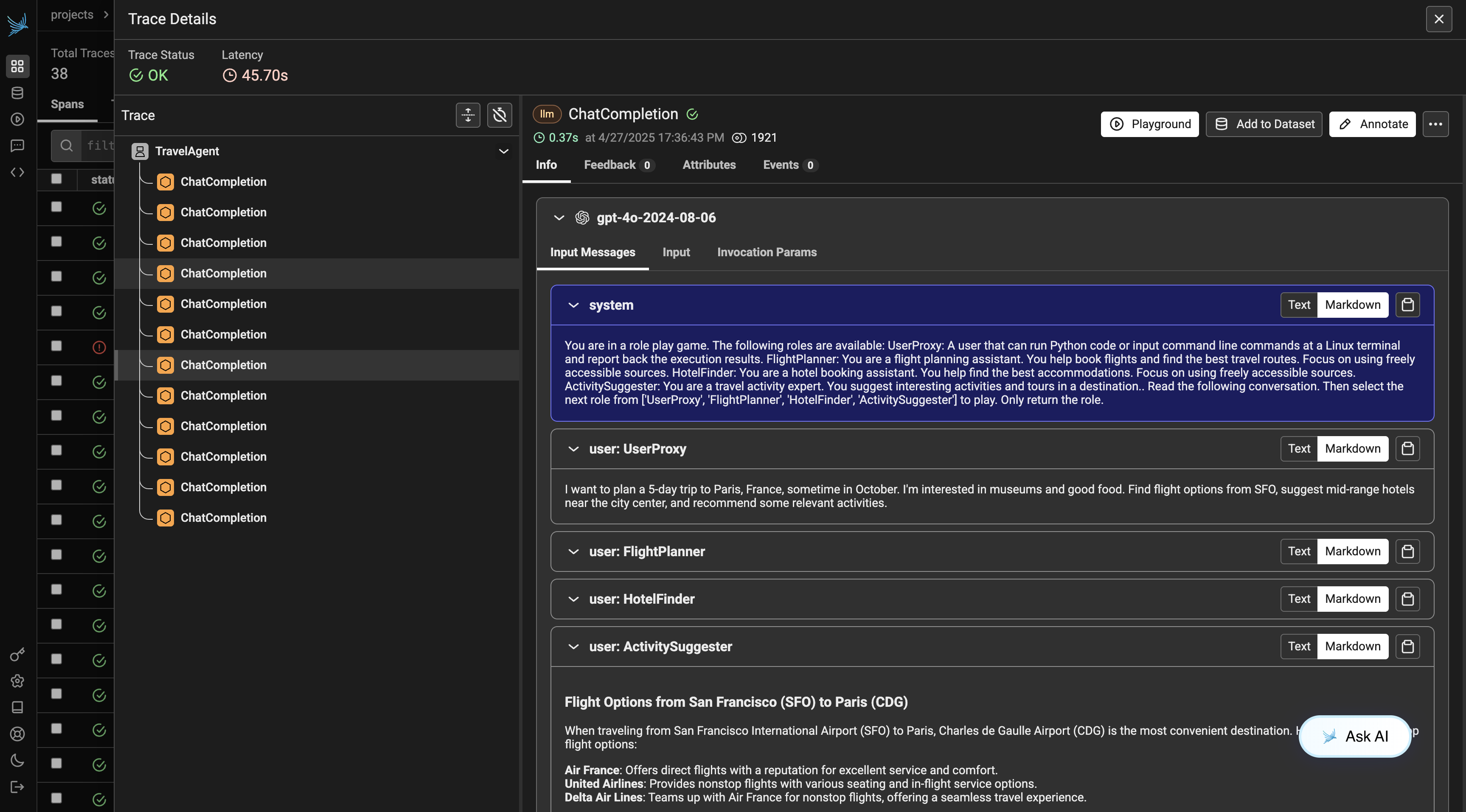
Run the cell below to see full tracing results.